
Tools
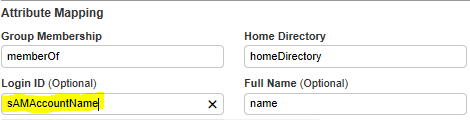
Configure LDAP authentication Login ID attribute using sAMAccountName in Serv-U
An article showing details on how to configure the Login ID to use sAMAccountName.
First published date
11/20/2019 8:44 PM
Last published date
10/21/2022 5:12 PM
Overview
By design, the Serv-U LDAP authentication uses the UserPrincipalName attribute of the AD, and some administrator does not want to use. In this case, we can use different attribute such as sAMAaccountName. Please refer to the steps below.
Product section
Serv-U Managed File Transfer & Serv-U FTP Server
Cause
NA
Resolution
1. Log in to the Serv-U management console.
2. Go to the Domain, select Users.
3. Click the LDAP authentication, select the LDAP server.
4. Click Show Advanced LDAP options.
5. In the search filter, set the following.
2. Go to the Domain, select Users.
3. Click the LDAP authentication, select the LDAP server.
4. Click Show Advanced LDAP options.
5. In the search filter, set the following.
(&(objectclass=user)(sAMAccountName=$LoginID))6. Change the Login ID into sAMAccountName.
7. Click Save,