
Tools
Configure Dameware Mini Remote Control (MRC) logging via the registry key
This article demonstrates how to set up Dameware logging via the registry key.
First published date
10/13/2020 12:05 AM
Last published date
10/13/2020 12:05 AM
Overview
The remote logging feature of the Dameware Mini Remote Control client agent enables administrators to send a copy of the Dameware Mini Remote Control entries recorded in the remote computer's Application Event log to a logging server. The log host must have a Dameware Mini Remote Control client agent installed. Remote logging is useful whenever you want to track who connects to the remote computer. For example, remote logging is often enabled to comply with Payment Card Industry (PCI) logging requirements.
Before you begin, ensure that the log host and the client agent computer are running the same version of the Dameware Mini Remote Control client agent.
Before you begin, ensure that the log host and the client agent computer are running the same version of the Dameware Mini Remote Control client agent.
Product section
Dameware Remote Support & Mini Remote Control
Resolution
Setting up the registry key value.
1. Open registry edit.
2. Navigate to Computer\HKEY_LOCAL_MACHINE\SOFTWARE\DameWare Development\Mini Remote Control Service\Settings.
3. Enable log reporting for this host is equivalent to Enable Logging to this host on the Dameware agent settings, the value 1 means active and 0 is disabled.

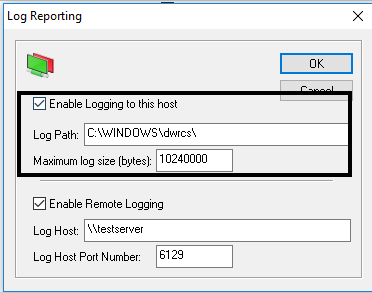
4. Log path is the host location.

5. Enable Log Reporting is the equivalent of Enable Remote Logging on the Dameware agent settings.

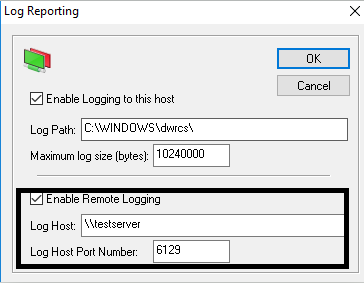
6. Log host is the remote host.

1. Open registry edit.
2. Navigate to Computer\HKEY_LOCAL_MACHINE\SOFTWARE\DameWare Development\Mini Remote Control Service\Settings.
3. Enable log reporting for this host is equivalent to Enable Logging to this host on the Dameware agent settings, the value 1 means active and 0 is disabled.
4. Log path is the host location.
5. Enable Log Reporting is the equivalent of Enable Remote Logging on the Dameware agent settings.
6. Log host is the remote host.