
Network Management
Configuration Wizard stuck at 98% Waiting for website for Orion
The article addresses the issue of seeing the Configuration Wizard stuck at 98% Waiting for website and taking a long time.
First published date
9/15/2021 5:00 AM
Last published date
2/8/2025 7:43 AM
Overview
During the upgrade or migration of SolarWinds Orion Core-based product, you may run into an issue where the Configuration Wizard is stuck at 98% waiting for the website.
Sample Image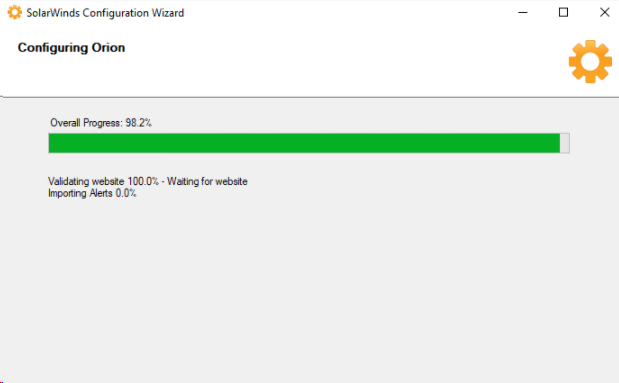
The ConfigurationWizard.log (C:\ProgramData\SolarWinds\Logs\Orion) continuously generates the error message below:
Sample Image
The ConfigurationWizard.log (C:\ProgramData\SolarWinds\Logs\Orion) continuously generates the error message below:
2021-09-14 22:26:44,154 [52] DEBUG TaskAdapter - Orion.ValidateWebsite [100.0%]:
Waiting for website
2021-09-14 22:26:44,670 [44] ERROR TaskAdapter - Progress value clipped to maximum:
Waiting for website 478749 of 300000
Product section
Orion Platform
Cause
Multiple Causes
1. Stale Primary Engine Entries in Engines, OrionServers, and Websites tables.
2. Permission / OS Issue.
1. Stale Primary Engine Entries in Engines, OrionServers, and Websites tables.
2. Permission / OS Issue.
00:26:33,369 [1] INFO Program - ShadowCopy Cache
'C:\Users\myusername\AppData\Local\Temp\SolarWinds\' cannot be deleted.
System.CannotUnloadAppDomainException: Error while unloading appdomain. (Exception
from HRESULT: 0x80131015)
System.CannotUnloadAppDomainException: Error while unloading appdomain. (Exception
from HRESULT: 0x80131015)
at System.AppDomain.Unload(AppDomain domain)
at SolarWinds.ConfigurationWizard.Host.Program.StartInDomain(String[] args)
Resolution
Check for old server database entries in the Orion database.
1. Make sure to stop the Orion services using Orion Service Manager.
2. Check the following tables using Database Manager.
4. Restart Orion services using Orion Service Manager.
The Orion Web Console should be accessible with no issues.
You can still try to rerun the Configuration Wizard to ensure it will complete 100%.
Other resolutions:
Restart Orion Server and re-run Configuration Wizard
1. Make sure to stop the Orion services using Orion Service Manager.
2. Check the following tables using Database Manager.
- Engines
- Websites
- OrionServers
4. Restart Orion services using Orion Service Manager.
The Orion Web Console should be accessible with no issues.
You can still try to rerun the Configuration Wizard to ensure it will complete 100%.
Other resolutions:
Restart Orion Server and re-run Configuration Wizard