
Network Management
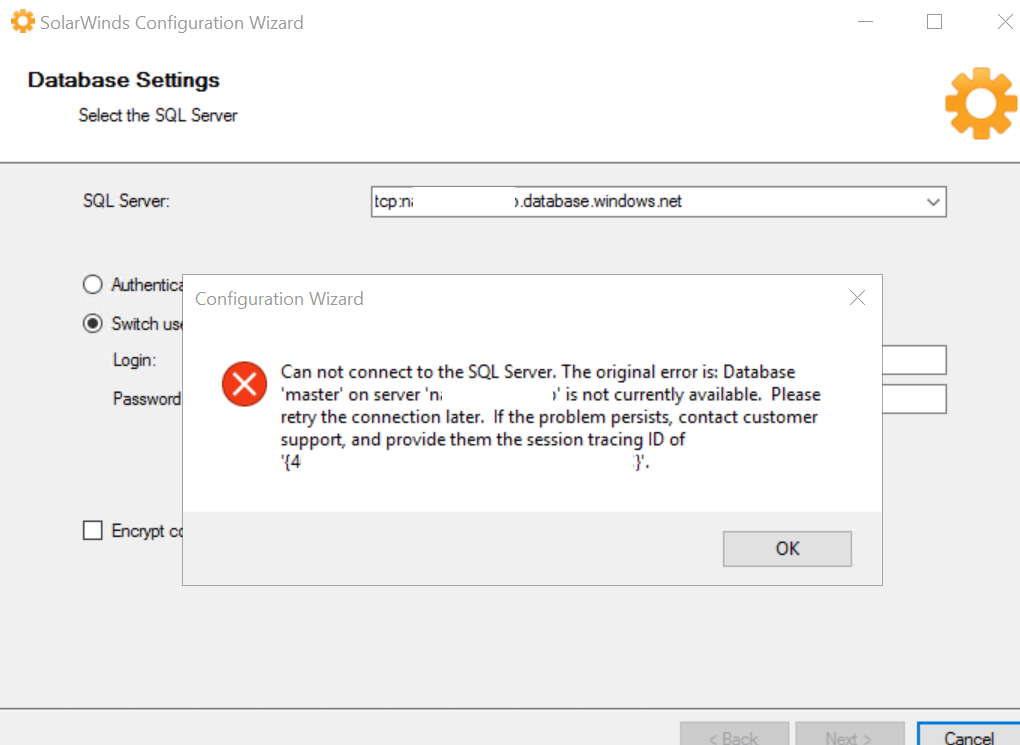
Configuration Wizard: Can not connect to the SQL Server. The original error is: Database 'master' on server 'XXXXXXXXX' is not currently available.
This article provides information and the step-by-step resolution in resolving the error in the Configuration Wizard if the SolarWinds databases are located in the cloud (Microsoft Azure or Amazon RDS).
First published date
4/4/2024 2:54 AM
Last published date
2/19/2025 8:58 PM
Overview
When running the Configuration Wizard, the customer will get an error for Can not connect to the SQL Server. The original error is: Database 'master' on server 'XXXXXXXXX' is not currently available. Please retry the connection later. If the problem persists, contact customer support, and provide them the session tracing ID of...
Product section
Network Performance Monitor
Cause
In version 2020.2.6 ",1433" was not a requirement in the SQL Server address if the database was located in the cloud.
Resolution
On version 2022 and above, it is recommended to add ",1433: in the SQL Server address in order for SolarWinds to be able to connect to the database in the cloud.
1. In the Configuration Wizard, add ",1433(comma port number)" at the end of the SQL Server address for all of the SolarWinds databases (SolarWindsOrion, SolarWindsOrionLog, and SolarWinds NetFlow Storage). For example tcp:XXXXXXX.database.windows.net,1433.
3. The Configuration Wizard will complete with no errors.
1. In the Configuration Wizard, add ",1433(comma port number)" at the end of the SQL Server address for all of the SolarWinds databases (SolarWindsOrion, SolarWindsOrionLog, and SolarWinds NetFlow Storage). For example tcp:XXXXXXX.database.windows.net,1433.
- NOTE: There is no space between the comma and the port number.
3. The Configuration Wizard will complete with no errors.