
Network Management
Communication Process Failed for the Primary Orion Server - Orion Environment Get Orion Server Certificate failed
ERROR Access to Orion.Environment.GetOrionServerCertificate verb denied is encountered when installing an Additional Polling Engine. Also occurs on Additional web server installation. The installation has failed with GetOrionServerCertificate verb denied.
First published date
4/29/2020 2:53 PM
Last published date
9/21/2022 10:01 PM
Overview
This article shows how to resolve the following error message received during installation.
ERROR Access to Orion.Environment.GetOrionServerCertificate verb denied is encountered when installing an Additional Polling Engine,
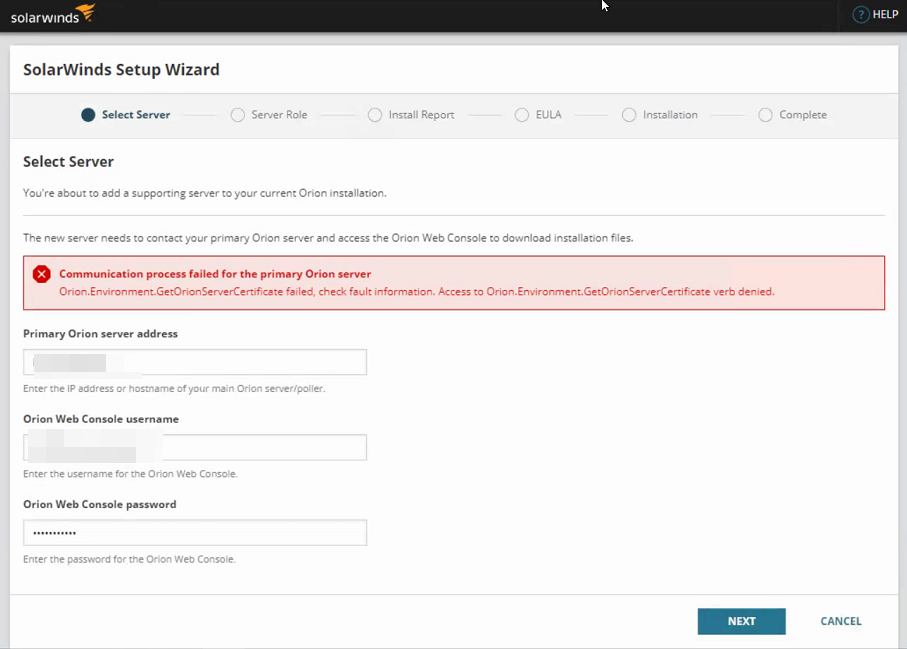
ERROR Access to Orion.Environment.GetOrionServerCertificate verb denied is encountered when installing an Additional Polling Engine,
Product section
Orion Platform
Cause
The credential being using during the installation of the Additional Polling Engine does not have Admin rights in Orion User Accounts.
Resolution
Log into your Orion web console.
- Go to Web console > Settings > All Settings > Manage Accounts.
- Select and Edit the account you entered into the installer for the Additional Polling Engine or Additional Web Server.
- Ensure the user has Administrator rights.
- Submit changes if necessary.
- Attempt the installation with the account once more.
- If you are using an AD user for the installer, make sure to use the Local admin account.