
Security Compliance
Chrome Fails to install on Server OS
If you are unable to install Chrome on a Windows server, this procedure describes how to remedy this.
First published date
4/4/2019 9:46 PM
Last published date
4/4/2019 9:46 PM
Overview
Chrome packages are built and designed to install on Workstation Computers so if you are unable to install Chrome on a Windows server, this procedure describes how to remedy this.
Product section
Patch Manager
Cause
Chrome packages are built and designed to install on Workstation Computers.
Resolution
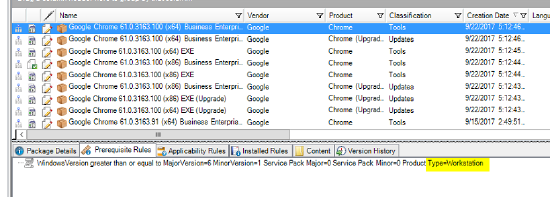
In the Pre Requisites inside the Google Chrome Packages, the details are slated for Workstation install.
You will have to customize this package and modify the Prerequisite Rule for server installation.
changing Type=Workstation
to Type=Server
To do this:
- Right click on the existing chrome package and select Duplicate.
- Find the Duplicate package. right click, and select Edit.
- In edit mode modify the name with a server Identifier.
- Click Next and create a new rule for the server product type.
- Delete the Workstation Rule.
- Click next to the end of the package modification, no other edits required.
- Publish package and approve for servers.