
Network Management
Change the URL of the Orion Web Interface used in Alert Macros
How to change the URL that is used in Alert url details. These are sometimes not matched up with the true server name of the Orion server. This is typically used when the website has a different name than the hostname of the main poller. Additional web server load balancer pointer.
First published date
9/10/2019 3:16 PM
Last published date
4/6/2023 10:31 AM
Overview
How to set or change the URL that is shown in the email notifications they receive for configured alerts in Orion.This is especially useful for environments that have an additional web server or multiple additional web servers of the Orion website and have a load balancing pointer. The url can be changed to the pointer that is being used.
Product section
Orion Platform
Cause
N/A
Resolution
To change or set the URL variable in alert message:
1. From the Orion web console settings page. (Settings> all settings > web console settings)
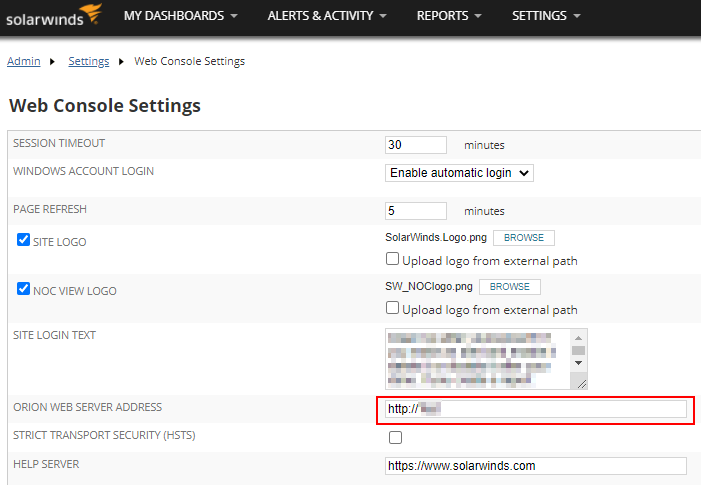
2. Locate the Orion Web Server address field and modify the URL.
3. Save changes with the submit button at the bottom of the page.
If these changes do not update the incoming alerts appropriately, please contact SolarWinds Technical Support.
1. From the Orion web console settings page. (Settings> all settings > web console settings)
2. Locate the Orion Web Server address field and modify the URL.
3. Save changes with the submit button at the bottom of the page.
If these changes do not update the incoming alerts appropriately, please contact SolarWinds Technical Support.