
Applications Systems
Enable Real-Time Process Explorer and Service Control Manager button in Node Details page
Real-Time Process Explorer, Service Control Manager, Event Log Viewer are missing from the Node Details Management resource. User does not have sufficient privileges in SAM. This article provides steps for changing the SAM User Role from User to Admin.
First published date
10/16/2018 6:24 PM
Last published date
4/1/2020 4:35 PM
Overview
This addresses concerns with the following tools missing from the Node Details Management resource tile:
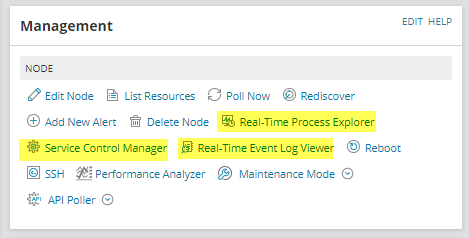
This describes how to properly set the permissions within Orion so the user will have rights to these tools.
- Real-Time Process Explorer
- Service Control Manager
- Real-Time Event Log Viewer
This describes how to properly set the permissions within Orion so the user will have rights to these tools.
Product section
Server Application Monitor
Cause
Insufficient rights are set for the currently logged in Orion user.
Resolution
- On the Orion Web Console, go to Settings > All Settings > Manage Accounts
- Check the specified account and hit EDIT to load Edit Account page
- Expand Server & Application Monitor Settings and adjust the following settings
(optional) SAM User Role >> Admin
Real-Time Process Explorer >> Full control/View Only
Service Control Manager >> Yes
Allow Service Action Rights >> Yes
- Hit Submit for the changes to take effect