
Network Management
Centralized upgrade failed due to double entries in OrionServers table
Centralized upgrade failed at Connecting to Scalability with error failed to connect to servers, this article guide you on how to troubleshoot this problem.
First published date
9/30/2019 2:00 AM
Last published date
9/30/2019 2:00 AM
Overview
- Centralized upgrade can be found in the Orion Web Console> Setting> My Orion Deployment> Updates Available
- This tab lists all available updates, including hotfixes and new versions, and provides links to release notes
- The issue happen at welcome> Connecting to scalability failed to connect to servers with below error
"message": "An error has occurred.",
"exceptionMessage": "An item with the same key has already been added.",
"exceptionType": "System.ArgumentException",
"stackTrace": " at System.ThrowHelper.ThrowArgumentException(ExceptionResource resource)\r\n at System.Collections.Generic.Dictionary`2.Insert(TKey key, TValue value, Boolean add)\r\n at System.Linq.Enumerable.ToDictionary[TSource,TKey,TElement](IEnumerable`1 source, Func`2 keySelector, Func`2 elementSelector, IEqualityComparer`1 comparer)\r\n at SolarWinds.Orion.HA.WebApi.DataAccess.HAPoolRepository.GetListOfOrionServers()\r\n at lambda_method(Closure , Object , Object[] )\r\n
"exceptionMessage": "An item with the same key has already been added.",
"exceptionType": "System.ArgumentException",
"stackTrace": " at System.ThrowHelper.ThrowArgumentException(ExceptionResource resource)\r\n at System.Collections.Generic.Dictionary`2.Insert(TKey key, TValue value, Boolean add)\r\n at System.Linq.Enumerable.ToDictionary[TSource,TKey,TElement](IEnumerable`1 source, Func`2 keySelector, Func`2 elementSelector, IEqualityComparer`1 comparer)\r\n at SolarWinds.Orion.HA.WebApi.DataAccess.HAPoolRepository.GetListOfOrionServers()\r\n at lambda_method(Closure , Object , Object[] )\r\n
Product section
Orion Platform
Cause
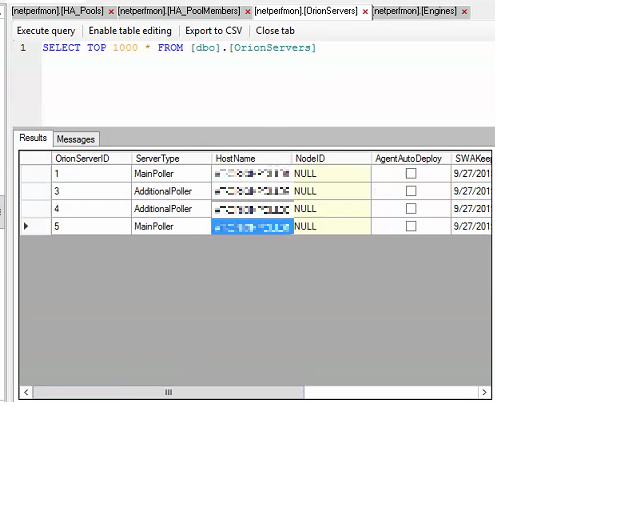
OrionServers table contains duplicate entries
e.g.
Having two MainPoller with the same name in the OrionServers table
e.g.
Having two MainPoller with the same name in the OrionServers table
Resolution
- Check the Licensing_LicenseAssignments table for the OrionServer which is tagged to the licenses
- Stop all Solarwinds services
- Remove the duplicate entry
- Restart the services
- Launch the centralized upgrade again, this time it should be able to list all available servers and continue the upgrade