
Tools
CatTools backup of Dell S3048-ON fails
This article shows how to troubleshoot an issue where the CatTools backup of Dell S3048-ON fails
First published date
9/22/2020 10:33 PM
Last published date
9/22/2020 10:33 PM
Overview
When running a Device Backup Running Config activity on a Dell Switch S3048-ON, it fails with an activity error: Failed to receive device config file".
The debug log will show no errors, but it will show it is trying to copy the config file but the configuration entries are incomplete.
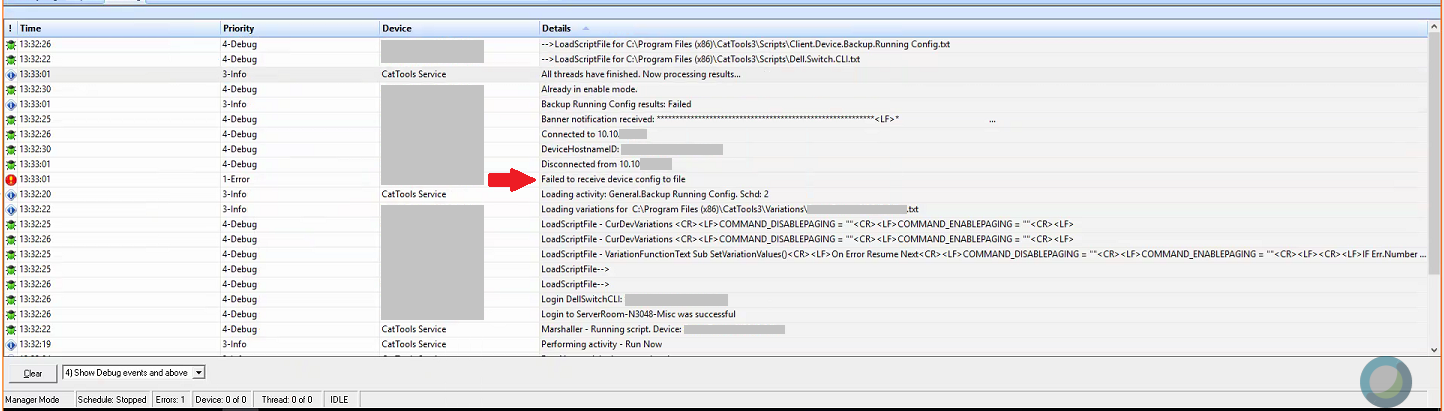
The debug log will show no errors, but it will show it is trying to copy the config file but the configuration entries are incomplete.
Product section
Kiwi CatTools
Cause
Resolution
- Edit the device > go to the variations tab > click Use Variations
- On the new window, click on the Additional Commands tab
- Put a check beside Disable Paging. Delete the default values, and replace them with 'terminal length 0'
- Put a check beside Enable Paging. Delete the default values, and replace them with 'terminal length 0'
- Save the changes and run the backup activity again.