
Network Management
Cannot logon Domain\Username when creating AD accounts
Cannot Add AD Account due to issue with Windows AD - Cannot logon 'domanin\account' via NetworkCleartext/Default. It is a bug in Product.
First published date
10/22/2018 2:06 PM
Last published date
6/20/2025 9:26 PM
Overview
When your deployment includes multiple trusted domains with your SolarWinds Platform products installed in one of them and are creating AD accounts so that users from the trusted domains can log in to the SolarWinds Platform Web Console, you receive the following error message even though the account and credentials are correct.
Cannot logon Domain\Username via NetworkCleartext/Default
Product section
Network Performance Monitor
Cause
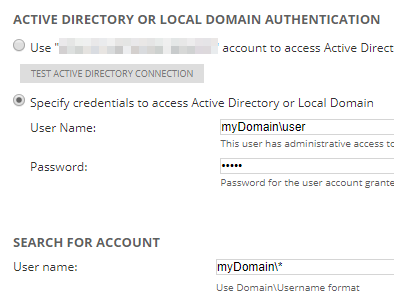
When you provide the User Name and Password in the Specify credentials section and then provide the domain\username in the Search for Account section, the Search tries to use data specified in the fields even though it does not need it.
Resolution
To resolve the issue:
- Select the Specify credentials to access... option to activate the User Name and Password fields.
- Clear the User Name field so that it is empty.
- Search again.
Another workaround: Create individual accounts for your users.