
Network Management
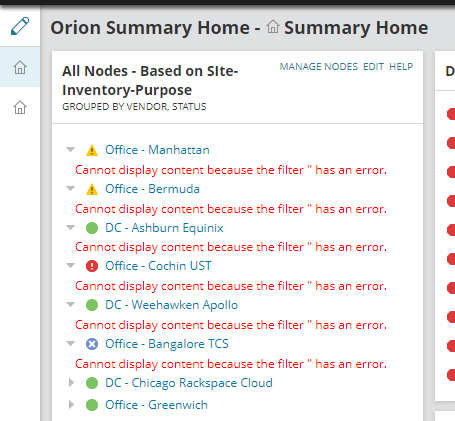
"Cannot display content because the filter has an error" error message in SolarWinds Platform Summary Page
This article shows on how to resolve an issue where "Cannot display content because the filter " has an error" error message in SolarWinds Platform Summary Home page in Web Console.
First published date
1/23/2023 1:33 PM
Last published date
5/29/2026 2:54 PM
Overview
This article shows on how to fix issue pertaining to "Cannot display content because the filter " has an error" error message in Orion Summary Home page in Orion Web Console.
Product section
Network Performance Monitor
Cause
The issue occurs due to custom property is no longer available and causes the dashboard widget not to display properly.
Resolution
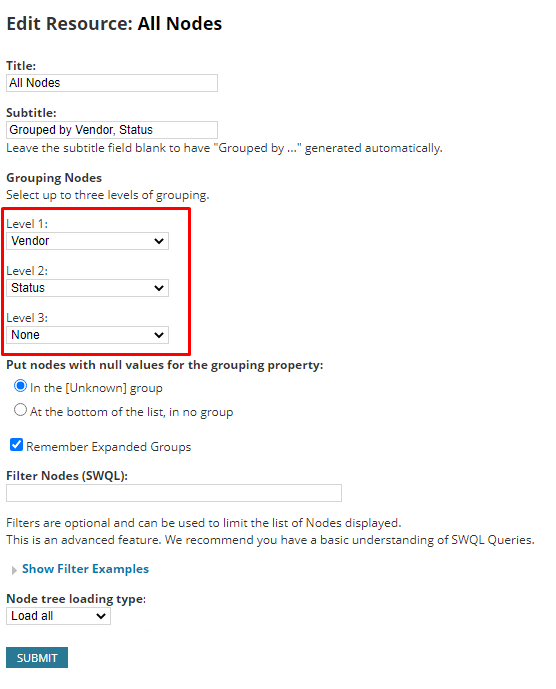
To resolve this issue perform the following steps:

Additionally, check on the values of the affected Custom Property or recreate the Custom Property.
- On SolarWinds Summary Home page, click Edit on the affected widget.
- From the drop-down boxes, review the filters to determine the missing/incorrect customer property causing the problem.
- Select any other filter and replace the current filter.
- Click Submit.
Additionally, check on the values of the affected Custom Property or recreate the Custom Property.