
Network Management
Cannot access NPM website
This article will give you some pointers to check when facing an issue in website
First published date
7/10/2019 2:12 AM
Last published date
12/9/2020 4:09 PM
Overview
The W3SVC service is a Windows service that is responsible for making IIS (Internet Information Services) work. The W3SVC service also manages the HTTP protocol and HTTP performance for IIS which needs to be running to allow Sisense (and other sites) to work.
When trying to start the website through IIS we encounter an error
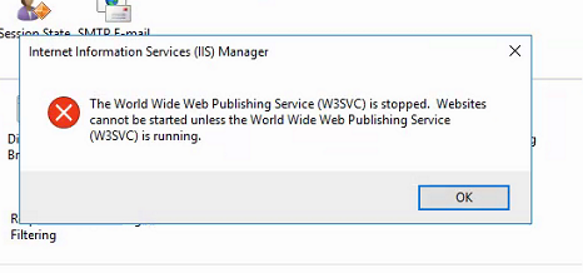
When trying to start the website through IIS we encounter an error
Product section
Network Performance Monitor
Cause
unknown
Resolution
- Right-click on your Start button to open the WinX Menu.
- Select Run. This opens the Run box.
- Now type services.msc in it and hit Enter to open the Services Manager.
- Make sure that Wold Wide Web Publishing service is running
Once the service is running, you may also check the following.
1. Old/invalid entries in the Websites table via Database Manager.
2. Check the certificate assigned to the SolarWinds website via IIS.
3. Run iisreset from the command prompt.
4. Restart Orion services.