
Network Management
Cannot Open Orion Report Writer, Syslog Viewer, or Trap Viewer
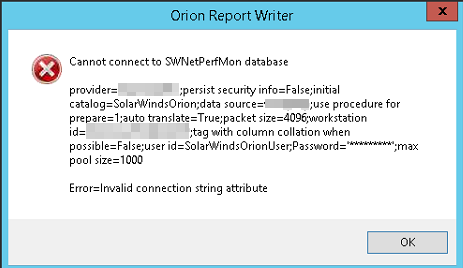
When opening Orion Report Writer, Syslog Viewer, or Trap Viewer, the user gets a popup window that says: Cannot connect to SWNetPerfMon database. Error=Invalid connection string attribute
First published date
10/22/2018 2:54 PM
Last published date
11/28/2022 5:14 AM
Overview
An error occurs when opening Orion Report Writer, Syslog Viewer, or Trap Viewer:
This usually occurs when TLS 1.0 and 1.1 are disabled.
Cannot connect to SWNetPerfMon database
Error=Invalid connection string attribute
This usually occurs when TLS 1.0 and 1.1 are disabled.
Product section
Orion Platform
Cause
Missing Microsoft® SQL Server® 2012 Native Client component.
Resolution
- Install Microsoft® SQL Server® 2012 Native ClientQFE on your Orion application server: https://www.microsoft.com/en-us/down....aspx?id=50402 (© 2019 Microsoft, available at www.microsoft.com, obtained on May 30, 2019)
- On your application server, go to "C:\Program Files (x86)\SolarWinds\Orion\"
- Make a backup of the file: SWNetPerfMon.db
- Open SWNetPerfMon.db in Notepad (as administrator).
- In the top-most section, probably the 4th line, it will say:
ConnectionString=provider=XXXXXXXXXX.Change this to:ConnectionString=provider=SQLNCLI11 - Do not make any other changes to this file. Save and close the db file.
Resolution 2:
1. Backup SwNetPerfmon file
2. Shut down Orion services
3. Use IP address instead of DNS name in Connection string in SwNetPerfmon file.
4. Start all Orion services
*If the client is on Orion 2020.2.5 try installing the HF.
Disclaimer: Please note, any content posted herein is provided as a suggestion or recommendation to you for your internal use. This is not part of the SolarWinds software or documentation that you purchased from SolarWinds, and the information set forth herein may come from third parties. Your organization should internally review and assess to what extent, if any, such custom scripts or recommendations will be incorporated into your environment. You elect to use third party content at your own risk, and you will be solely responsible for the incorporation of the same, if any.2. Shut down Orion services
3. Use IP address instead of DNS name in Connection string in SwNetPerfmon file.
4. Start all Orion services
*If the client is on Orion 2020.2.5 try installing the HF.