
Network Management
Can't disable snap to grid in Orion Maps on the SolarWinds Platform
Entities added to Orion Maps are snapping to grid positions and disabling the option has no effect.
First published date
10/7/2022 5:27 PM
Last published date
10/7/2022 5:27 PM
Overview
When adding entities to Orion Maps, their position may be set using the Size & Position menu on the right:
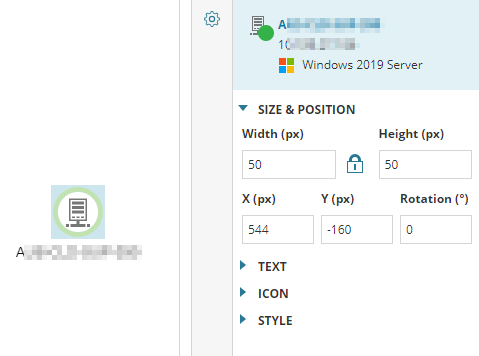
By default, dragging these entities on the map will snap their position to a grid that increments by 32 pixels at a time. Deselecting the Snap To Grid Option in the More Menu does not apply, and entities are still snapped to grid positions.
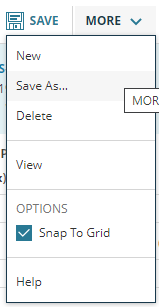
Additionally, negative values cannot be set manually for position. Attempting to do so will revert to the previous value.
By default, dragging these entities on the map will snap their position to a grid that increments by 32 pixels at a time. Deselecting the Snap To Grid Option in the More Menu does not apply, and entities are still snapped to grid positions.
Additionally, negative values cannot be set manually for position. Attempting to do so will revert to the previous value.
Product section
Network Performance Monitor
Cause
Unknown
Resolution
There exists a workaround, but not a full fix. If you experience this issue, please submit a ticket to work with SolarWinds Support.
Workaround:
Workaround:
- Log into the Orion Web Console.
- Navigate to Home > Maps (this is listed as Orion Maps on 2020.2.6).
- Add Map.
- Add entities to the map.
- Select an entity and set a custom position using positive values.
- Uncheck and recheck the Snap to Grid option.
- Try dragging the entity - this should now move freely without snapping to grid coordinates.