
Network Management
CPU or Memory Not Working for SNMP Managed Nodes in Orion Platform
Helps remediate CPU and memory issues with nodes that are managed via SNMP. This helps correct OID's polled by Orion for improper memory or CPU. Utilize the Poller Checker Tool on the Orion polling engine. CPU and memory statistics are not polling. ERROR DataPreProcessing - Processing result: PollerResultWrapper: PollerType=N.Memory.SNMP.CpqHostPhysicalMemory, NetObject=N:xxxx ErrorCode=FFFFFFFF, ErrorMessage=Unable to compute memory for x.x.x.x.
First published date
9/30/2019 3:32 PM
Last published date
10/11/2022 9:39 PM
Overview
Any issues with SNMP-managed nodes that are not collecting memory or CPU or other statistics correctly can be addressed with this article.
Note: This is NOT considered a permanent fix. This is a workaround. Issues with SNMP should always be resolved with the device vendor.
Product section
Network Performance Monitor
Cause
Default OID(s) for CPU/Memory is not working correctly on the target machine.
Resolution
Utilize the Poller Checker Tool on the Orion polling server. This is located at
%:\Program Files (x86)\SolarWinds\Orion\PollerCheckTool.exe
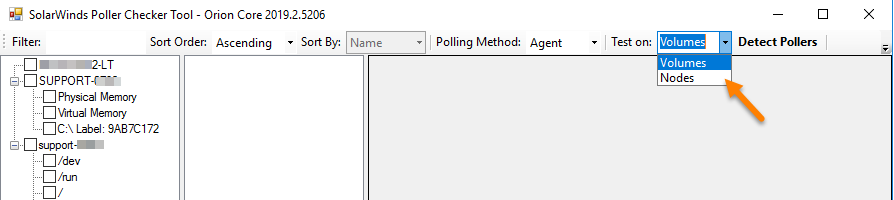
Upon opening, the tool defaults to showing Volume objects. You will want to switch this in the top toolbar to show Node objects.
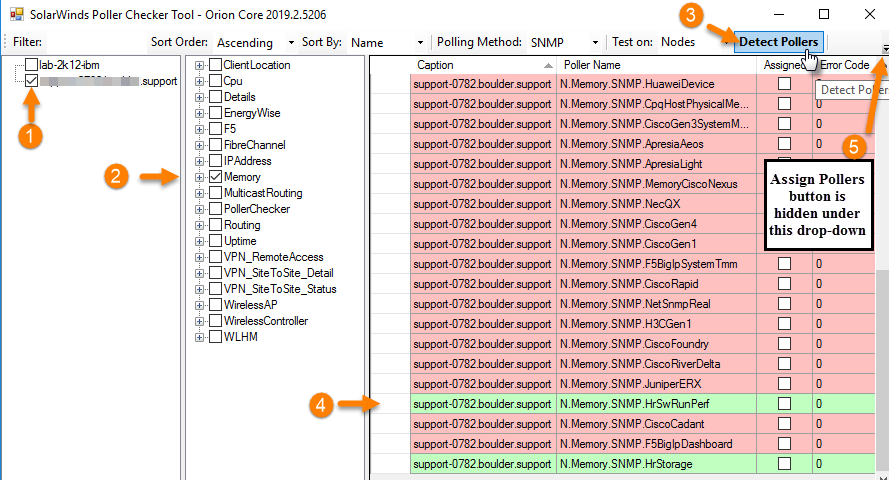
Once the tool populates with node objects, you may select the node, select memory or CPU in the middle pane window, and select the 'Detect Pollers' button. Click one of the alternative pollers that is valid in light green. Then click
For more information on the Poller Checker tool.
%:\Program Files (x86)\SolarWinds\Orion\PollerCheckTool.exe
Upon opening, the tool defaults to showing Volume objects. You will want to switch this in the top toolbar to show Node objects.
Once the tool populates with node objects, you may select the node, select memory or CPU in the middle pane window, and select the 'Detect Pollers' button. Click one of the alternative pollers that is valid in light green. Then click
For more information on the Poller Checker tool.