
Network Management
Bulk update of SNMP Credentials for existing monitored nodes in Orion
Bulk change/update of SNMP credentials for managed nodes in Solarwinds Orion
First published date
5/31/2019 11:21 AM
Last published date
12/11/2022 12:22 AM
Overview
This article is about updating SNMP credentials using Orion console
Product section
Orion Platform
Cause
N/A
Resolution
GUI / Web console Method
1. Go to Settings > Manage Nodes
2. Set the Grouping filter to SNMP version
3. Select Version 2 / V3 depending on your scenario.
4. If you like to select all nodes, then put a check on the first checkbox on the node list and it will select all items displayed on the page. You may also select specific nodes individually or apply more filters (custom property / location etc) if needed.
5. Click Edit Properties
6. Put a check on Polling Method
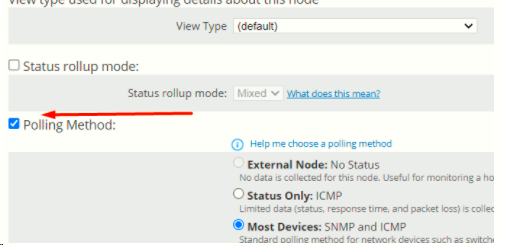
7. Select the right credential or update a specific value and click on Submit and wait for page to refresh itself. Depending on how many nodes you have selected, it make take few seconds to few minutes.
Note: It make take few mins for the node status to update once you hit the submit button.
1. Go to Settings > Manage Nodes
2. Set the Grouping filter to SNMP version
3. Select Version 2 / V3 depending on your scenario.
4. If you like to select all nodes, then put a check on the first checkbox on the node list and it will select all items displayed on the page. You may also select specific nodes individually or apply more filters (custom property / location etc) if needed.
5. Click Edit Properties
6. Put a check on Polling Method
7. Select the right credential or update a specific value and click on Submit and wait for page to refresh itself. Depending on how many nodes you have selected, it make take few seconds to few minutes.
Note: It make take few mins for the node status to update once you hit the submit button.