
Network Management
Bps In and Bps Out not displayed for Palo Alto GlobalConnect clients
On the web console all information related to NetInsight for Palo Alto is displayed but not bps in or out for the GlobalConnect clients.
First published date
10/3/2019 5:55 AM
Last published date
10/3/2019 5:55 AM
Overview
Upon adding a PaloAlto node to NPM and enabling the poll for NetInsight all information is being displayed correctly apart from the bandwidth consumption for the GlobalConnect clients.
Product section
Network Performance Monitor
Cause
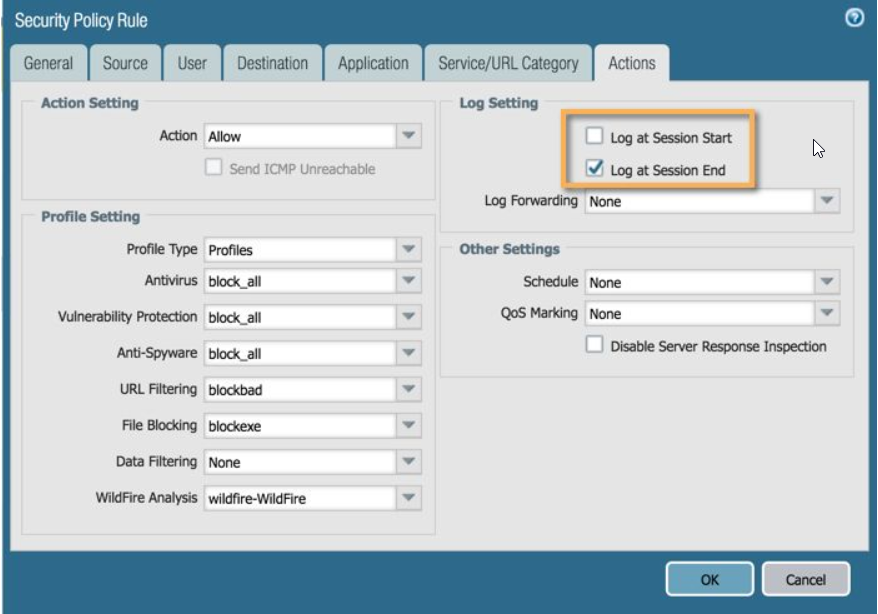
By default, the option to poll the data about bandwidth is disabled, since it requires special privileges. Please ensure that the Log Setting on the PaloAlto device is configured and the advanced option enable.
Resolution
PaloAlto configuration required for bps information on GlobalConnect VPNs
Once the option above is confirmed to be enabled, please enable the feature in NPM by doing the following: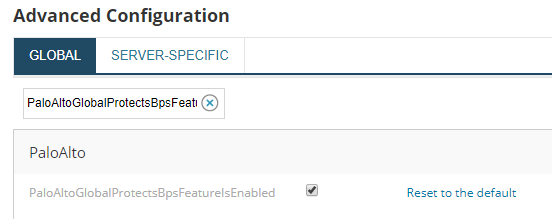
Allow sometime for the information to be displayed on the web console.
- NPM polls this information from "Session End" log entries
- If those are not available, NPM indicates no traffic and there is a possibility of high resource consumption on the device (thus the option is disabled by default)
Once the option above is confirmed to be enabled, please enable the feature in NPM by doing the following:
- Navigating to <OrionURL>/orion/admin/advancedconfiguration/global.aspx
- Search for "PaloAltoGlobalProtectsBpsFeatureIsEnabled"
- Enable it
- Press Save at the bottom of the page
Allow sometime for the information to be displayed on the web console.