
Database Management
BI xPress - Monitoring Dashboard "Conversion failed when converting from a character string to uniqueidentifier." Error
A "Conversion failed when converting from a character string to uniqueidentifier" error displays when attempting to open the Monitoring Console.
First published date
8/4/2021 1:28 PM
Last published date
8/4/2021 1:28 PM
Overview
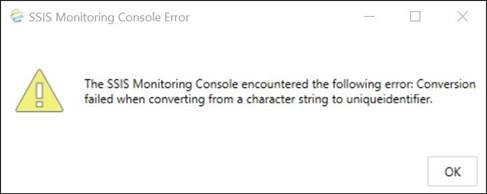
When opening the Monitoring Console, you are presented with the following warning message:
The SSIS Monitoring Console encountered the following error: Conversion failed when converting from a character string to uniqueidentifier.
This issue has been resolved as of Workbench version 2017.3.3. If you are unable to update to this or a more recent version of the software, the below steps will resolve the issue.
The SSIS Monitoring Console encountered the following error: Conversion failed when converting from a character string to uniqueidentifier.
This issue has been resolved as of Workbench version 2017.3.3. If you are unable to update to this or a more recent version of the software, the below steps will resolve the issue.
Product section
BI xPress
Cause
N/A
Resolution
Our development team has provided a script (attached) to manually fix this.
Step 1: Close Workbench.
Step 2: Open SQL Server Management Studio.
Step 3: Copy/Paste the T-SQL Script below into a new query window.
Step 4: Select the BIxPress database that is throwing the error.
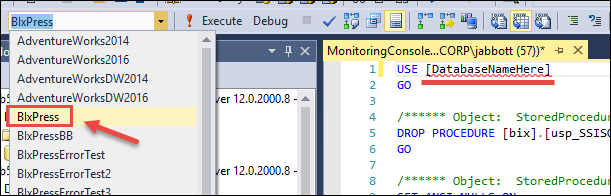
Step 5: If utilizing the USE statement, then update it to reflect the correct BI xPress Database – if selecting it from step four above, you can exclude the USE and GO on the first two lines when you run the script.
Step 6: Execute Script.
Step 7: Open Workbench, and Open the Monitoring Dashboard – problem solved.
[bix].[usp_SSISOps_Audit_SpecificPackageExecutions_65]
Once deleted, then open the Monitoring Console and upgrade the database using the built-in scripts from the Workbench (which will pop up automatically).
Step 1: Close Workbench.
Step 2: Open SQL Server Management Studio.
Step 3: Copy/Paste the T-SQL Script below into a new query window.
Step 4: Select the BIxPress database that is throwing the error.
Step 5: If utilizing the USE statement, then update it to reflect the correct BI xPress Database – if selecting it from step four above, you can exclude the USE and GO on the first two lines when you run the script.
Step 6: Execute Script.
Step 7: Open Workbench, and Open the Monitoring Dashboard – problem solved.
USE [DatabaseNameHere]
GO

/****** Object:  StoredProcedure [bix].[usp_SSISOps_Audit_SpecificPackageExecutions_65]    Script Date: 5/22/2017 1:21:50 PM ******/
DROP PROCEDURE [bix].[usp_SSISOps_Audit_SpecificPackageExecutions_65]
GO

/****** Object:  StoredProcedure [bix].[usp_SSISOps_Audit_SpecificPackageExecutions_65]    Script Date: 5/22/2017 1:21:50 PM ******/
SET ANSI_NULLS ON
GO

SET QUOTED_IDENTIFIER ON
GO

/*
* Object: usp_SSISOps_Audit_SpecificPackageExecutions
* --------------------------------------------------------------
* Source : Pragmatic Works - BI xPress Auditing Framework 65
* Created By : Matt Whitfield
* Created On : 3/20/2017
* Purpose : Loads package executions given a specific list of package execution IDs in a comma separated list
* --------------------------------------------------------------
*/
CREATE PROCEDURE [bix].[usp_SSISOps_Audit_SpecificPackageExecutions_65]
(
    @ExecutionIDs VARCHAR(MAX),
    @MaxVariableLength INT = NULL
)
AS
BEGIN
    SET NOCOUNT ON
    SET @MaxVariableLength = ISNULL(@MaxVariableLength, 4000)

       DECLARE @UniuqeIds TABLE ([UniqueId] UNIQUEIDENTIFIER NOT NULL)

       INSERT INTO @UniuqeIds
           SELECT u.[UniqueId]
           FROM [dbo].[fn_ParseUniqueIdentifierList](@ExecutionIDs) u

    SELECT
          [s].[LogID]
        , [s].[ExecutionID]
        , [s].[PackageName]
        , ISNULL([s].[LayoutID], 0) AS [LayoutID]
        , [s].[ExecutionStartDateTime]
        , [s].[ExecutionEndDateTime]
        , ISNULL([s].[TotalErrorCount], 0) AS [TotalErrorCount]
        , [Variables] = (
                (CASE WHEN DATALENGTH([s].[Variables]) > @MaxVariableLength
                    THEN LEFT(CAST([s].[Variables] AS NVARCHAR(MAX)), @MaxVariableLength) + ' ***** <LARGE STRING [Data truncated] - ' + CAST((DATALENGTH([s].[Variables])/1024) AS NVARCHAR(100)) + ' KB> Change max variable length option to see the full value *****'
                    ELSE [s].[Variables]
                 END)
            )
        , [s].[Connections]
        , [s].[UserName]
        , [s].[MachineName]
        , [s].[InteractiveMode]
        , [c].[ExecutionId] As [CatalogExecutionId]
        , [c].[PackageId] As [CatalogPackageId]
        , [c].[PackageGu Step 5: If you utilize the USE statement then update it to reflect the correct BI xPress Database – if you selected it from step four above, you can exclude the USE and GO on the first two lines when you run the script.
Step 6: Execute Script.
Step 7: Open Workbench, and Open the Monitoring Dashboard – problem solved.

Some customers may still experience this and if they have installed BI xPress version 2017.2.8.525 or later, all they need to do is go into the BI xPress Database and delete the following stored procedure:
[bix].[usp_SSISOps_Audit_SpecificPackageExecutions_65]

Once deleted, then open the Monitoring Console and upgrade the database using the built in scripts from the Workbench (which will pop up automatically).
id] As [CatalogPackageGuid]
        , [c].[FolderId] As [CatalogFolderId]
        , [c].[FolderName] As [CatalogFolderName]
        , [c].[ProjectId] As [CatalogProjectId]
        , [c].[ProjectName] As [CatalogProjectName]
        , [c].[MachineName] As [CatalogMachineName]
        , [c].[ServerName] As [CatalogServerName]
        , [c].[Status] As [CatalogStatus]
        , [c].[StoppedByName] As [CatalogStoppedByName]
    FROM [bix].[vw_SSISPackageExecutionLog_65] AS [s] (NOLOCK)
        INNER JOIN @UniuqeIds u
            ON [u].[UniqueId] = [dbo].[fn_ToUniqueIdentifier]([s].[ExecutionID])
        LEFT OUTER JOIN [bix].[vw_SSISCatalogPackageExecution_65] [c] (NOLOCK)
            ON [c].[ExecutionGuid] = [dbo].[fn_ToUniqueIdentifier]([s].[ExecutionID])
    ORDER BY [s].[LogID] DESC

    SET NOCOUNT OFF
END

GO
*Note: Some customers may still experience this if they have installed BI xPress version 2017.2.8.525 or later. If so, go into the BI xPress Database and delete the following stored procedure:[bix].[usp_SSISOps_Audit_SpecificPackageExecutions_65]
Once deleted, then open the Monitoring Console and upgrade the database using the built-in scripts from the Workbench (which will pop up automatically).