
Database Management
BI xPress - How to Create the BI xPress Database
This article provides some guidance on how to create the BI xPress Database
First published date
8/5/2021 2:05 PM
Last published date
8/5/2021 2:05 PM
Overview
If recently installed BI xPress and need to create the BI xPress Database (or simply create a new repository for various reasons), this can easily be done through the Workbench Application.
Product section
BI xPress
Cause
N/A
Resolution
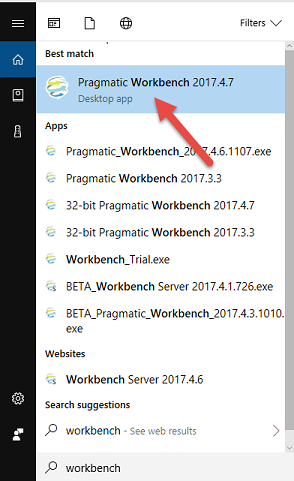
1. Open the Workbench application:
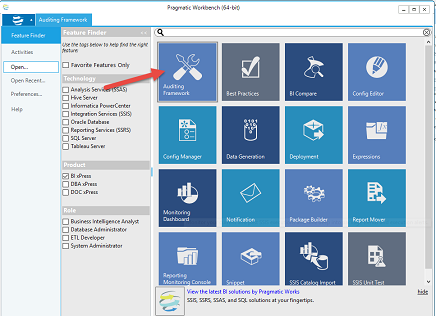
2. Select the “Auditing Framework” feature tile:
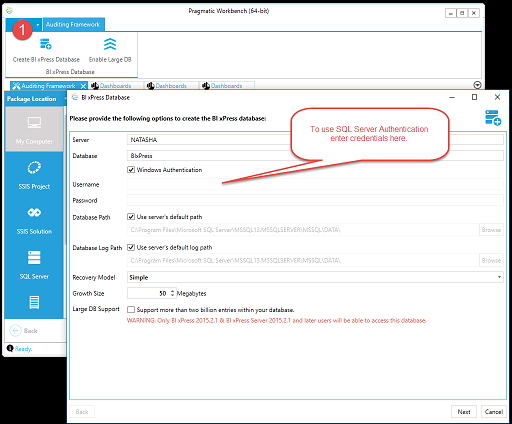
3. Notice the option to “Create BI xPress Database.” (Selecting this will bring up the page to enter all configuration options. Designate the server you would like the database to reside on and the name for the BI xPress database. We recommend naming the database “BI xPress,” but there is the option to use whatever naming convention is ideal for the environment. If there are additional questions on which configurations to use, we recommend contacting your DBA.)
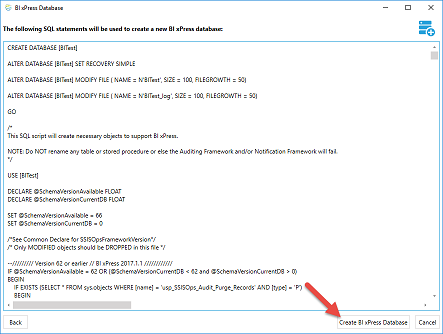
4. Clicking the “Next” button will generate the script necessary to create the database based on the settings entered.
5. Select “Create BI xPress Database”:
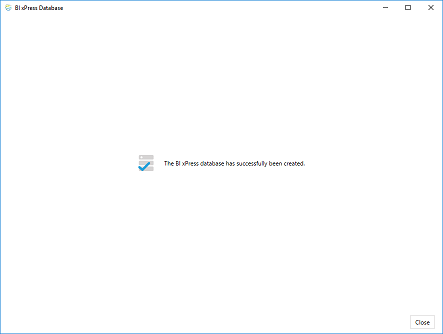
6. Once the script has finished running; a notification will display successful database creation:
2. Select the “Auditing Framework” feature tile:
3. Notice the option to “Create BI xPress Database.” (Selecting this will bring up the page to enter all configuration options. Designate the server you would like the database to reside on and the name for the BI xPress database. We recommend naming the database “BI xPress,” but there is the option to use whatever naming convention is ideal for the environment. If there are additional questions on which configurations to use, we recommend contacting your DBA.)
4. Clicking the “Next” button will generate the script necessary to create the database based on the settings entered.
5. Select “Create BI xPress Database”:
6. Once the script has finished running; a notification will display successful database creation: