
Network Management
Autonomous System (AS) chart showing data is not available
Chart for Autonomous System (AS) are showing "Data is not available"
First published date
10/22/2018 7:35 PM
Last published date
10/22/2018 7:35 PM
Overview
Chart for Autonomous System (AS) are showing Data is not available.
Product section
Netflow Traffic Analyzer
Cause
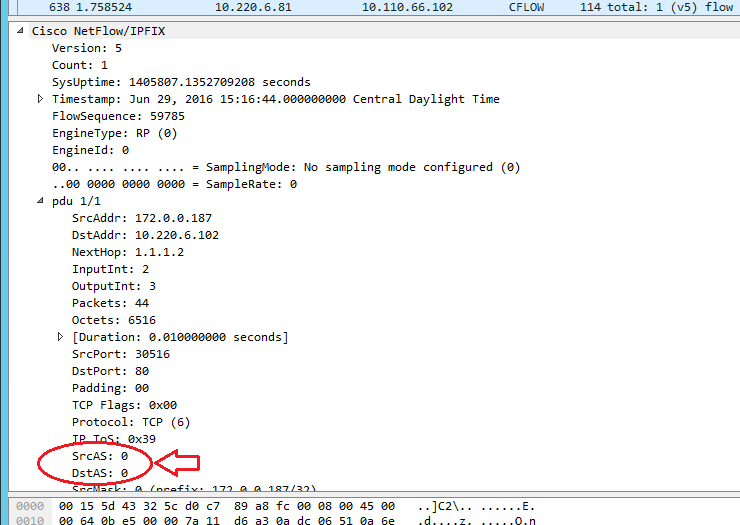
Flows that NTA is receiving from devices have either the AS number for both the source and destination set to 0 or no AS number at all. See the screenshot below for what it looks like when the AS in the flow is 0. Below are also some Wireshark filters that you can use to see what AS numbers you are receiving from what devices. By default, SolarWinds will show that "Data is not available" in NTA if the only AS number it is receiving, for both source and destination, is 0 or no AS number at all.
There are a couple of reasons the AS values are set to 0 or not available in the flow data:
1. The device is not part of an Autonomous System and does not participate in BGP routing
2. The device has not been configured to export BGP data
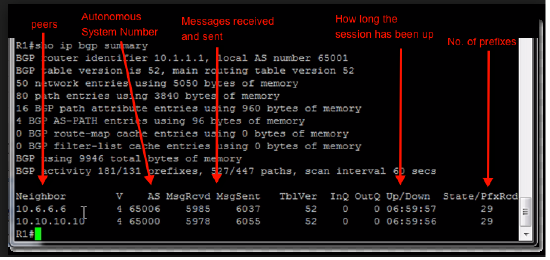
In order to identify if the router is configured as a BGP router run the following command via command line on the router
show ip bgp summary.
This will be the output of the command. If there no output like the image below then the device is not running BGP protocol:
There are a couple of reasons the AS values are set to 0 or not available in the flow data:
1. The device is not part of an Autonomous System and does not participate in BGP routing
2. The device has not been configured to export BGP data
In order to identify if the router is configured as a BGP router run the following command via command line on the router
show ip bgp summary.
This will be the output of the command. If there no output like the image below then the device is not running BGP protocol:
Resolution
Configuring device to export Autonomous System ( BGP) information.
Netflow v5 and standard Netflow v9. The addition of [peer-as | origin-as] is what configures the router to collect Autonomous System information
router(config)# ip flow-export version 5 (or version 9) [peer-as | origin-as]
Flexible Netflow . The commands below should be added to the Flow Record
Collect IP Source AS
Collect IP Destination AS
Wireshark Filters:
The below filter will show you the flow that are sending an AS number of 0.
cflow and (cflow.srcas == 0 and cflow.dstas == 0)
The filters below will show you the flows that have an AS number greater than 0. If the filters returns no results then its more then likely that you're receiving flows that have either the AS set to 0 or the flow does not specify an AS number.
cflow and (cflow.srcas > 0 or cflow.dstas > 0)
or
cflow and (cflow.srcas > 0 and cflow.dstas > 0)
Screenshot:
Netflow v5 and standard Netflow v9. The addition of [peer-as | origin-as] is what configures the router to collect Autonomous System information
router(config)# ip flow-export version 5 (or version 9) [peer-as | origin-as]
Flexible Netflow . The commands below should be added to the Flow Record
Collect IP Source AS
Collect IP Destination AS
Wireshark Filters:
The below filter will show you the flow that are sending an AS number of 0.
cflow and (cflow.srcas == 0 and cflow.dstas == 0)
The filters below will show you the flows that have an AS number greater than 0. If the filters returns no results then its more then likely that you're receiving flows that have either the AS set to 0 or the flow does not specify an AS number.
cflow and (cflow.srcas > 0 or cflow.dstas > 0)
or
cflow and (cflow.srcas > 0 and cflow.dstas > 0)
Screenshot: