
Network Management
Client on ASA devices with AnyConnect sessions shows blank entries for the IP Address on the database.
The article explains as to why we are only registering only the first line entry of the three Session Indexes
First published date
5/6/2020 2:41 AM
Last published date
5/6/2020 2:41 AM
Overview
The database shows blank entries for the IP Address for a client with AnyConnect sessions. When checking the SNMP walk, it contains two other Session Indexes that registers the client's IP Address.
Below is a sample result of the query ran on dbo.ASARemoteAccessSession:
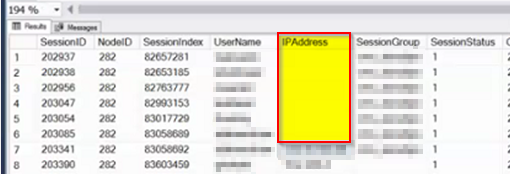
The article explains as to why we are only registering only the first line entry of the three Session Indexes
Below is a sample result of the query ran on dbo.ASARemoteAccessSession:
-- Scripts are not supported under any SolarWinds support program or service.
-- Scripts are provided AS IS without warranty of any kind. SolarWinds further
-- disclaims all warranties including, without limitation, any implied warranties
-- of merchantability or of fitness for a particular purpose. The risk arising
-- out of the use or performance of the scripts and documentation stays with you.
-- In no event shall SolarWinds or anyone else involved in the creation,
-- production, or delivery of the scripts be liable for any damages whatsoever
-- (including, without limitation, damages for loss of business profits, business
-- interruption, loss of business information, or other pecuniary loss) arising
-- out of the use of or inability to use the scripts or documentation.

SELECT * FROM {SolarWindsOrion].[dbo].[ASA_RemoteAccessSessions]
The article explains as to why we are only registering only the first line entry of the three Session Indexes
Product section
Orion Platform
Cause
This is due to the AsaRaDeduplication setting being enabled on the Orion Configuration. AnyConnect client always opens three tunnels by default - the main one, SSL and DTLS. Orion, by default, filters out SSL and DTLS tunnels, and keep only the main one (usually with lower session index).
Resolution
Disable AsaRaDeduplication on Orion. Please refer to the article for the procedure.
How to disable AsaRaDeduplication
How to disable AsaRaDeduplication