
Network Management
Preflight Check Did Not Finish Error
This article provides resolution information for errors that might occur when you install SolarWinds Platform products.
First published date
10/12/2018 11:13 AM
Last published date
10/31/2025 7:07 PM
Overview
An unexpected exception occurred during installation
Details are as follows:
System.IO.DirectoryNotFoundException: Could not find a part of the path 'C:\ProgramData\Application Data\Solarwinds\ADResults\'.
A similar error may be seen when running the 2025.2 offline installer.
Product section
Orion Platform
Cause
Most likely with A/V and permissions to the directory.
Resolution
If the error details state, "This installation is forbidden by system policy," the following procedure may correct the issue for installations on Windows 7.
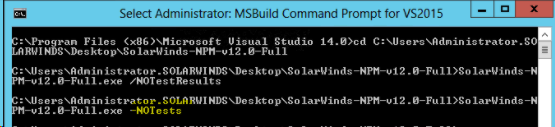
If you still have the same issue, try to run the installer with -NoTest switch (Make sure the CMD is running as an Administrator.)
- Click Start > Control Panel.
- Click Administrative Tools.
- Click Local Security Policy.
- In the left pane, click Software Restriction Policies.
- If no software restrictions are defined, right-click Software Restriction Policies in the left pane, and then click New Software Restriction Policy.
- Click Enforcement.
- Select All users except local administrators.
- Click OK.
- Reboot your SolarWinds server.
If you still have the same issue, try to run the installer with -NoTest switch (Make sure the CMD is running as an Administrator.)