
Network Management
The SolarWinds Platform Configuration Wizard is unable to run and shows an "An exception occurred fetching the DB branding version" error
This article contains remediation steps for when the SolarWinds Platform Configuration Wizard fails with a DB branding version error.
First published date
8/27/2024 4:28 AM
Last published date
10/6/2025 3:39 PM
Overview
When running the SolarWinds Platform Configuration Wizard, the wizard is stopped when selecting a database account and throws an error, as shown in the screenshot below:
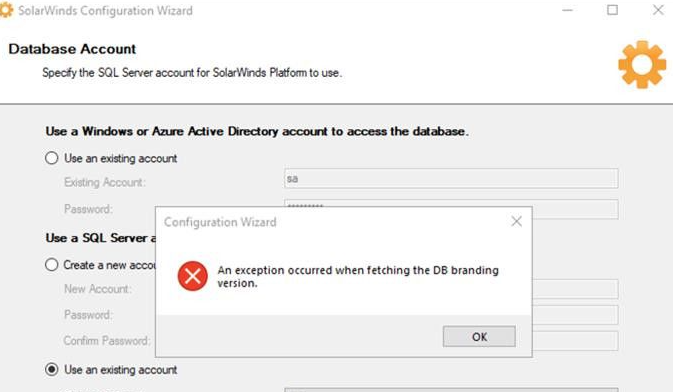
A record of this error can also be found in the log at C:\ProgramData\SolarWinds\Logs\Orion\ConfigurationWizard.log.
An exception occurred fetching the DB branding version.
A record of this error can also be found in the log at C:\ProgramData\SolarWinds\Logs\Orion\ConfigurationWizard.log.
Product section
Network Performance Monitor
Cause
The SQL server is trying to use the domain account during impersonation and failing when utilizing a local account.
Resolution
Resolution 1
Verify that the Branding Version value matches between the Registry and WebSettings Table in the SolarWinds Database.- Press Win + R to open the Run command window, add regedit and press enter to open the registry editor.
- Navigate to HKLM>Software>WOW6432Node>Solarwinds\Installer > InstalledBrandingVersion
- Open Database Manager from the SolarWinds Platform folder of the Start menu.
- Select Add Orion Server, then expand the SQL server and SolarWinds database in bold.
- Navigate to and double-click the WebSettings table.
- Click Execute Query in the window on the right to select the first 1000 rows of the table
- Check the SettingValue of the SettingName Branding Version and ensure it matches the registry entry. If it does not, select Edit table, double-click the cell in the database to add the entry from the registry, and press enter to confirm the change.
- Execute the query again to ensure the change was saved, and run the Configuration Wizard again.