
Applications Systems
An error was encountered while installing updates: Virtualization Manager - Can't download file
Getting below error while downloading and installing the upgradation file. An error was encountered while installing updates: Virtualization Manager - Can't download file https://downloads.solarwinds.com/solarwinds/CatalogResources/VMAN/2020.2.6/2020.2.6.50161/VMAN Hotfix 3.msp, because of the failure during package file location Check Virtualization Manager log file for more details. Server <APEServerName>. Log file location: C:\ProgramData\Solarwinds\Logs\Installer\2022-03-06_00-03-36
First published date
3/6/2022 11:01 AM
Last published date
3/6/2022 11:01 AM
Overview
Main poller was upgraded via Offline installer, but while upgrading Scalability engines from 2020.2.4 to 2020.2.6 HF4 via centralized upgrade tool, you may see this error Pollers and Additional webservers.
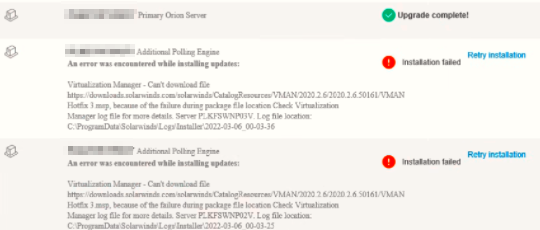
And Main poler has 2020.2.6 HF4 installed already and was upgraded, so the above error does not make sense.

And when you try to use the pre-stage file(s) in Upgrade and Evaluations tab in web console, we see the exact root cause - the upgrade above was failing due to expired VMAN license.

And Main poler has 2020.2.6 HF4 installed already and was upgraded, so the above error does not make sense.
And when you try to use the pre-stage file(s) in Upgrade and Evaluations tab in web console, we see the exact root cause - the upgrade above was failing due to expired VMAN license.
Product section
Virtualization Manager
Cause
Likely due to an Expired VMAN license
Resolution
Renew VMAN license if you wish to continue using VMAN.
If you do not wish to use VMAN anymore, then
1. Follow the instructions to Uninstall VMAN after evaluation
2. Check if VMAN module is no longer appearing in Web console > Settings > All Settings > License Manager
3. If the VMAN module still showing up then follow the steps to Remove expired Orion product evaluation from License Manager
4. Re-run the setup to upgrade.
If you do not wish to use VMAN anymore, then
1. Follow the instructions to Uninstall VMAN after evaluation
2. Check if VMAN module is no longer appearing in Web console > Settings > All Settings > License Manager
3. If the VMAN module still showing up then follow the steps to Remove expired Orion product evaluation from License Manager
4. Re-run the setup to upgrade.