
Applications Systems
Menu Item SQL Server missing from Orion Dashboards
This article explains how to troubleshoot the menu item missing from the Orion Dashboard, e.g. 'SQL Server'
First published date
7/13/2020 11:59 AM
Last published date
7/13/2020 11:59 AM
Overview
'SQL Server' is a menu item of SAM, it can be found in My Dashboard> Application
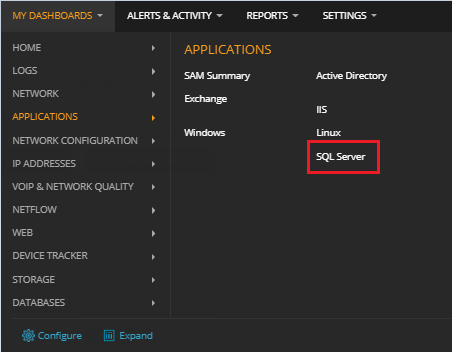
For some reason, the item is missing from the Dashboard, while clicking on configure dashboard, the Menu Item 'SQL Server' is not in the available item list neither.
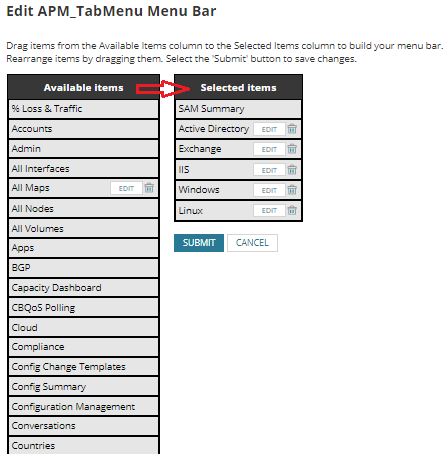
For some reason, the item is missing from the Dashboard, while clicking on configure dashboard, the Menu Item 'SQL Server' is not in the available item list neither.
Product section
Server Application Monitor
Cause
The Menu item is missing from the MenuItems table
Resolution
Repair SAM
1. Always make sure there is a recent backup of the environment (Database and Orion Server)
2. Log in to Orion NPM Server as a Windows Local Administrator.
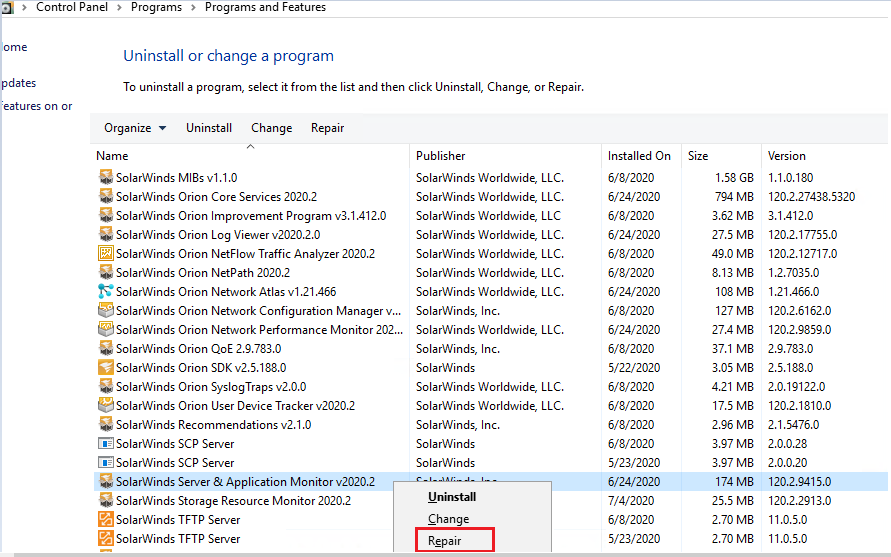
3. Click Start > Control Panel > Programs and Features.
4. Right-click SolarWinds Server & Application Monitor, and select Repair. After the repair, the Configuration Wizard is launched.
5. Complete the Configuration Wizard to complete the repair process.
1. Always make sure there is a recent backup of the environment (Database and Orion Server)
2. Log in to Orion NPM Server as a Windows Local Administrator.
3. Click Start > Control Panel > Programs and Features.
4. Right-click SolarWinds Server & Application Monitor, and select Repair. After the repair, the Configuration Wizard is launched.
5. Complete the Configuration Wizard to complete the repair process.