
Network Management
Alerts and Reports Menus not Displaying in Orion Web Console
Logging in to the Orion Web Console as a user with the Show Alerts Menu and Show All Reports Menu does not display the expected tabs.
First published date
10/28/2021 6:19 PM
Last published date
10/28/2021 6:19 PM
Overview
When configuring an account to show the alerts and reports tabs, administrator rights are not required. Setting the Show Menu option to Yes should allow the tabs to be shown, but logging in shows these tabs missing:
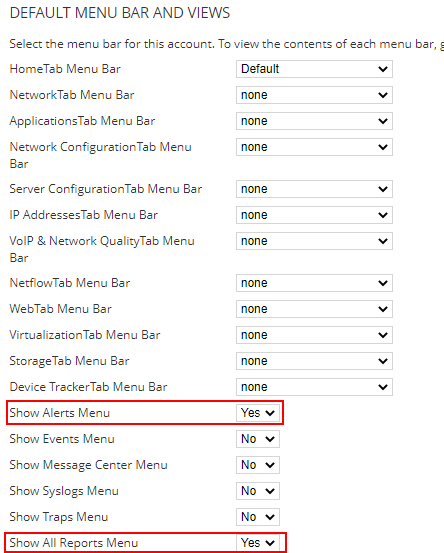

There are no related errors in the logs, but there are entries in the UserWebViews table of the database, where WebViewID 1 indicates the Alerts Menu and WebViewID 4 indicates the Reports Menu:
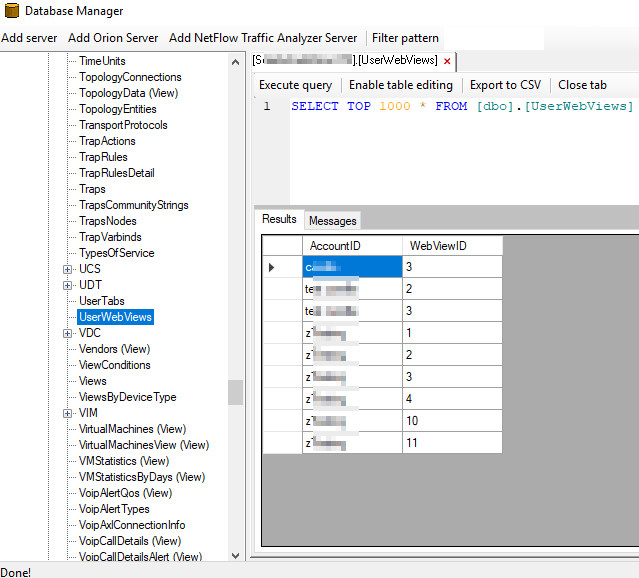
There are no related errors in the logs, but there are entries in the UserWebViews table of the database, where WebViewID 1 indicates the Alerts Menu and WebViewID 4 indicates the Reports Menu:
Product section
Network Performance Monitor
Cause
Stuck data in the UserWebViews table not respecting the setting change in the Orion Web Console.
Resolution
- Connect to the Orion server
- Open Database Manager from the Start Menu
- Select Add Orion Server
- Expand the server and Orion Database in bold
- Navigate to the UserWebViews table and double-click
- Execute Query in the window on the right
- Identify the user in question and check for IDs 1 and 4
- If present, delete the entries:
- Select Enable Table Editing
- Highlight the rows with IDs 1 and 4
- Right-click and select Delete Selected Rows
- Click Yes on the Prompt
- Re-Execute Query to confirm the entries are removed
- Go back to the Orion Web Console and test the user - the menus should now display: