
Security Compliance
After ARM upgrade login no longer works
Unable to access ARM Client after upgrade.
First published date
10/29/2020 12:17 PM
Last published date
8/8/2022 7:00 AM
Overview
After the ARM upgrade, the ARM Client login doesn't work. From the log files, database-related errors are noticeable and ARM Service cannot start successfully. When examining the logs files, the following errors can be found in the ARM server log (armServer.log):
Error      ] DataBaseHelper.HandleDataBaseSqlException(Object source, SqlException exception, String sqlCommand): System.Data.SqlClient.SqlException (0x80131904): Could not allocate a new page for database 'Solarwinds_ARM' because of insufficient disk space in filegroup 'PRIMARY'. Create the necessary space by dropping objects in the filegroup, adding additional files to the filegroup, or setting autogrowth on for existing files in the filegroup.
--BEGIN-OF-EXCEPTION------------------------------------------------------------
System.Data.SqlClient.SqlException (0x80131904): Could not allocate a new page for database 'Solarwinds_ARM' because of insufficient disk space in filegroup 'PRIMARY'. Create the necessary space by dropping objects in the filegroup, adding additional files to the filegroup, or setting autogrowth on for existing files in the filegroup.
   at pn.database.msSql.MsGenericDataBaseTransaction`2.ExecuteSqlCommandWithResults(String sqlCommand, SqlParameter[] parameterList)
Error Number:1101,State:12,Class:17
Additional infos that might be helpful on research: ErrorNumber: 1101, ErrorClass: 17, ErrorState: 12, ErrorCode: -2146232060
--END-OF-EXCEPTION--------------------------------------------------------------
Product section
Access Rights Manager
Cause
With the new version, ARM needs to create or update existing tables and for doing so it needs extra space in the database file or log file. If there is no space left on the SQL server or growth for database files is limited, this action will fail and the ARM server will not start correctly, ending in the boot loop.
Resolution
The solution is to check if there is enough space left on the SQL server where the ARM database is. The next step is to make sure that files size for the database is not limited and auto-growth is enabled.
To check this, please follow these steps: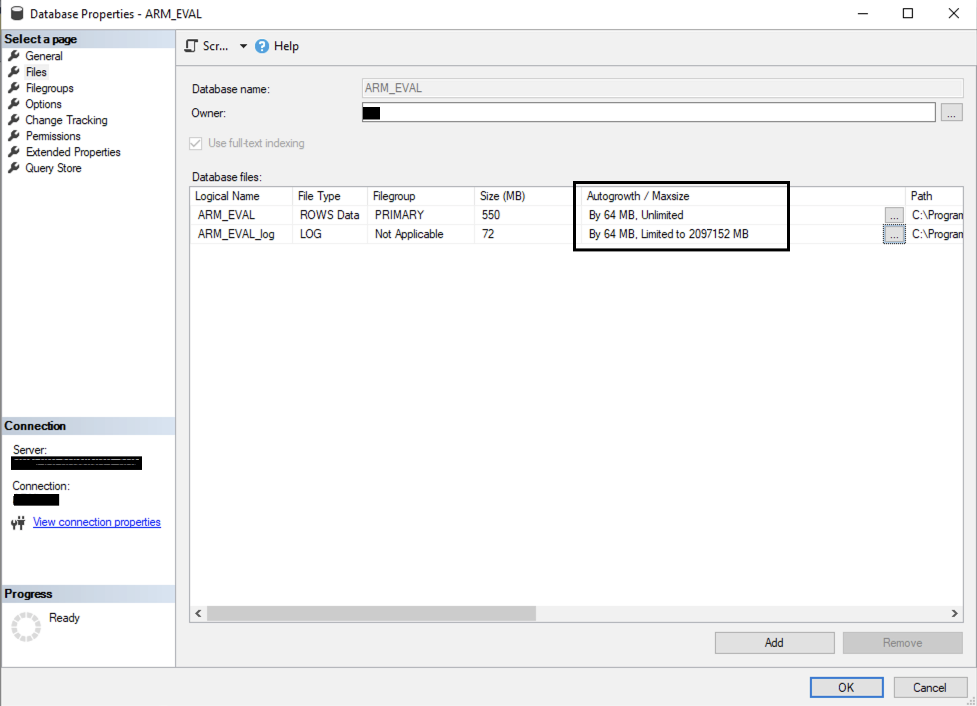
(Screenshot property of © 2020 Microsoft)
To check this, please follow these steps:
- Open SQL Management Studio
- Log in and select ARM database
- Right-click on the database and select properties
- From the left menu select Files
- And check the settings for the Autogrowth/Maxsize like on a screenshot below
(Screenshot property of © 2020 Microsoft)