
Applications Systems
Adjust Logging for SolarWinds.SEUM.AgentDomainConfigurationTool.exe
WPM SolarWinds.SEUM.AgentDomainConfigurationTool.exe.config. SolarWinds WPM Domain Accounts Configuration Tool is failing. domain configuration tool displaying error. Mutex G. Wait for access to mutex has timed out Global/S. Player domain user tool is malfunctioning. Single sign-on users, agent active directory users, Player worker processes.
First published date
4/1/2020 8:36 AM
Last published date
6/25/2020 1:37 AM
Overview
The agent domain configuration tool is used in WPM to enable the use of Domain accounts by the Player service. This is useful in running transactions that utilize SSO or Windows user authentication. If this tool displays messages or errors during use, it does not always provide detailed insight into the root cause. This article helps adjust logging so that more information can be provided.
Useful in situations where the following message is received in the Domain Configuration tool.
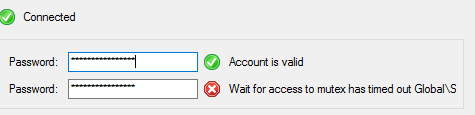
See also:
• Wait for access to mutex has timed out Global/S
• Configuring domain accounts in WPM
Useful in situations where the following message is received in the Domain Configuration tool.
See also:
• Wait for access to mutex has timed out Global/S
• Configuring domain accounts in WPM
Product section
Web Performance Monitor
Resolution
The tool is located here at the installation location of the Player (typically C drive):
\ProgramFiles (x86)\SolarWinds\Orion\SEUM\Player\
The configuration file that governs the tool is located in the same path with a .CONFIG file extension (e.g.SolarWinds.SEUM.AgentDomainConfigurationTool.exe.config). The entry to adjust is <level value="INFO" within the sections
You may set to one of the following:
C:\ProgramData\SolarWinds\Logs\SEUM
\ProgramFiles (x86)\SolarWinds\Orion\SEUM\Player\
The configuration file that governs the tool is located in the same path with a .CONFIG file extension (e.g.SolarWinds.SEUM.AgentDomainConfigurationTool.exe.config). The entry to adjust is <level value="INFO" within the sections
<log4net>
  ...
  <root>
    <level value="INFO"/>
  </root>
  ...
</log4net>
You may set to one of the following:
- OFF
- VERBOSE
- TRACE
- DEBUG
- INFO
- WARN
- ERROR
C:\ProgramData\SolarWinds\Logs\SEUM