
Network Management
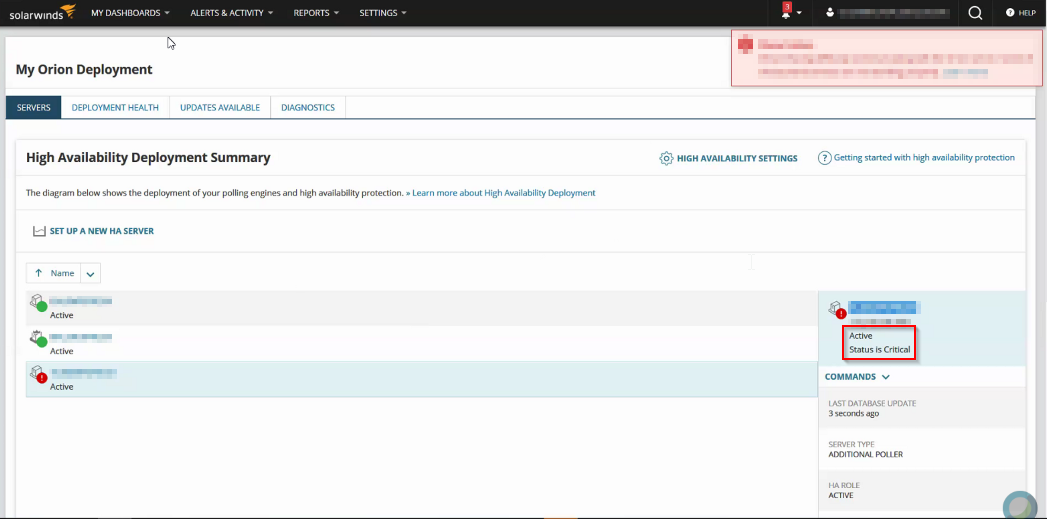
Additional Polling Engine is showing Critical on High Availability Deployment Summary page
Some of the Additional Polling Engines are showing Status is Critical or Status is Down (red in status) on the High Availability Deployment Summary page.
First published date
9/23/2019 12:46 AM
Last published date
3/3/2023 11:47 PM
Overview
This article provides the steps on how to resolve issues where the polling engines are showing Status is Critical or Status is Down on the High Availability Deployment Summary page. If you check from the Polling Engines page on the Orion Web console, Settings > All Settings > Polling Engines, the polling engine status is UP and the database is in sync.
Product section
Orion Platform
Cause
If any Orion services are stopped or stuck they can cause the status to show as Critical or Down.
Resolution
Resolution #1
- Check if the licenses are activated on the polling engine. Here's how to Activate licenses for Orion Platform products.
- Stop and restart the SolarWinds High Availability service from services.msc.
- Check the Orion Web Console, and the status of the polling engines should now show as UP.
Resolution #2
- If any Orion services are stopped, restart the services.
- Check Windows services (services.msc) and ensure all SolarWinds services are started.
For further troubleshooting, you may investigate the log files within C:\ProgramData\ SolarWinds\Logs\HighAvailability\HighAvailability.Service.log. This log typically indicates which service could be restarting, and causing the engine to show up is critical. From there, you can further investigate the business layer log file or service/process that is restarting.
Resolution #3
HA service in services.msc is showing in running state. In the HighAvailability.Service.log you'll see the below error.
2022-10-18 11:06:20,329 [7] WARN SolarWinds.Orion.HighAvailability.Common.Utilities.HaOrionRegistrySettings - Orion HA (module#4571) registry configured: False
2022-10-18 11:06:20,329 [7] ERROR SolarWinds.HighAvailability.Kernel.ServiceContainer - >null: Exception in ServiceContainer.Start(): SolarWinds.HighAvailability.Utilities.Exceptions.PluginsProviderException: Plugin 'SolarWinds.Orion.HighAvailability.HaOrionPlugin' not yet configured and will not start.
- This indicates the HA service is not registered on the Server per registry configuration / Corrupted.
- (Applies to Orion Platform version 2020.2.6 and below)
- To fix this, repair the High Availability plugin from Add/Remove programs > Run Configuration wizard on the problem server.
- For Orion Observability. if you run into a similar error, then repair the Observability Program from Add / Remove programs.