
Applications Systems
Windows Scheduled Tasks Monitor (WSTM) polling fails for nodes with UPN-formatted credentials in SAM
When using UPN formatted credentials (user@domain) polling fails with a "FailedAudit" error. You may also see an Access Denied error after adding WSTM to a node with UPN credentials in an Active Directory environment.
First published date
1/13/2020 7:37 PM
Last published date
2/26/2025 2:06 AM
Overview
This article describes how to resolve an issue that occurs when SAM converts domain credentials in UPN format (user@domain) into local credentials. If this happens, you may notice that:
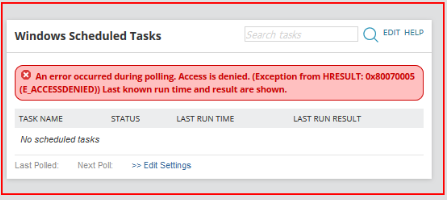
- After adding Windows Scheduled Tasks Monitor (WSTM) to a node with UPN credentials in an Active Directory environment. An error appears in the WSTM widget and messages similar to the following appear in logs:
- The Windows Scheduled Tasks Monitor (WSTM) option is not available in List Resources widget on WMI nodes.
- During Asset Inventory polling of nodes with credentials in UPN format. After clicking "Poll now", a FailedAudit error occurs because a local account is used instead of the domain account.
- The Windows Scheduled Tasks widget on the Node Details page displays an "Access is denied" error.
Product section
Server Application Monitor
Cause
Authentication for UPN-formatted credentials is not transmitted properly. For example, "aad.local" may be sent as ".".
Resolution
Use the down-level logon name format (domain\user) instead of UPN format (user@domain).
To learn more, see User Name Formats (© 2020 Microsoft Corp., available at docs.microsoft.com, obtained on January 15, 2020).
To learn more, see User Name Formats (© 2020 Microsoft Corp., available at docs.microsoft.com, obtained on January 15, 2020).