
Tools
Access the remote device in Windows Safe Mode using Dameware Remote Everywhere (DRE)
This article demonstrates how to remote access remote devices in Windows Safe Mode.
First published date
11/10/2021 3:02 AM
Last published date
12/3/2021 9:53 PM
Overview
The Dameware Remote Everywhere is a powerful remote tool that you can use on various devices, including Windows in Safe Mode.
Product section
Dameware Remote Everywhere
Cause
-
Resolution
1. While on remote session using the DRE.
2. Click the options (arrow down icon) on the Viewer's top pane.

3. Click Restart & Shutdown and alternatively use the key shortcut Ctrl + BkSp.
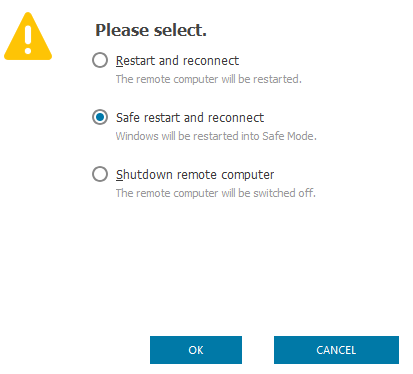
4. Select Safe restart and reconnect.
2. Click the options (arrow down icon) on the Viewer's top pane.
3. Click Restart & Shutdown and alternatively use the key shortcut Ctrl + BkSp.
4. Select Safe restart and reconnect.