
Security Compliance
Access Denied error when shutting down a computer in Patch Manager
This article provides information about the access denied error when shutting down a computer via Patch Manager
First published date
3/11/2022 9:18 AM
Last published date
3/11/2022 9:18 AM
Overview
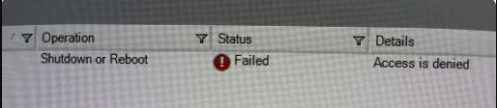
This is the error when you issue 'Shutdown or Reboot' to a Computer in Patch Manager
Product section
Patch Manager
Cause
- Credential used has not enough permission
- Group Policy settings on the environment not permitted to have a remote Shutdown or Reboot
Resolution
- First to check is if the credential used configured in the Credential Ring, has a Domain Admin privilege
- Check below Policy settings in your Domain and apply it
Policy Location: Computer Configuration\Windows Settings\Security Settings\Local Policies\User Rights Assignment
Action: Add the User Credential
Policy Name: Shutdown: Allow system to be shut down without having to log on
Policy Location: Computer Configuration\Windows Settings\Security Settings\Local Policies\Security Options
Action: Set to Enable
3. Then apply it by doing 'gpupdate /force'