
Security Compliance
ARM server will not connect or Collectors will not connect to the ARM server.
In ARM version 2020.2.3 Access Rights Manager started using GRPC. This has caused connection issues with the ARM server itself and the collectors.
First published date
4/30/2021 3:09 PM
Last published date
6/2/2021 3:33 PM
Overview
GRPC is an open-source Remote Procedure Call (RPC) framework that runs in the ARM environment. ARM started to utilize GRPC in version 2020.2.3, since then we have seen cases where the ARM server will not connect and Collectors will fail to connect to the ARM server.
Product section
Access Rights Manager
Cause
Since changing to GRPC in ARM we have to set an environment variable. This variable needs to be set on the ARM server and the collectors.
Variable name: GRPC_DNS_RSOLVER
Variable value: Native
Variable name: GRPC_DNS_RSOLVER
Variable value: Native
Resolution
On the ARM server create the environmental variable.
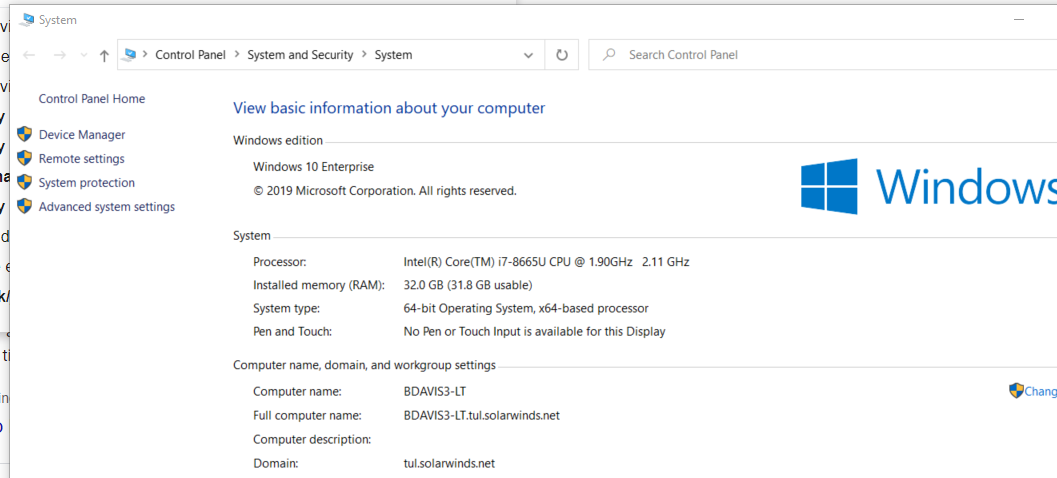
1. Right-click on the Windows Tab.
2. click system
3. click on system info
4. click on advanced system settings
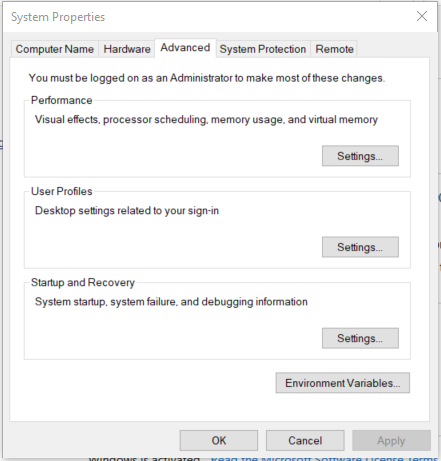
5. In system Properties, click on Environmental Variables..
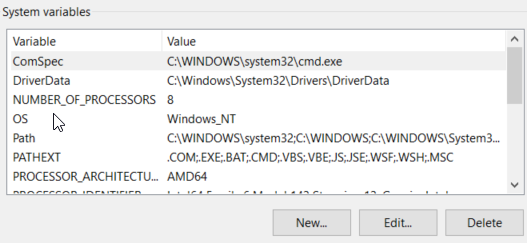
6. Under System variables
7. choose new
9.
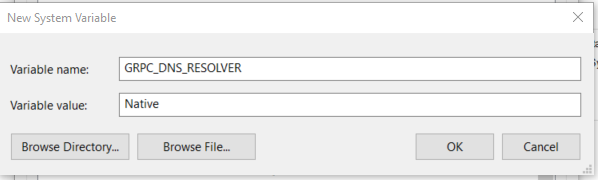
10. enter Variable name: GRPC_DNS_RESOLVER
Variable value: Native
Once you have done this on the ARM server do the same on all the collectors.
1. Right-click on the Windows Tab.
2. click system
3. click on system info
4. click on advanced system settings
5. In system Properties, click on Environmental Variables..
6. Under System variables
7. choose new
9.
10. enter Variable name: GRPC_DNS_RESOLVER
Variable value: Native
Once you have done this on the ARM server do the same on all the collectors.