
Network Management
Additional Polling Engine (APE) upgrade fails with "Package [Observability:XXXXXX] from main server was not found in Product Catalog"
When upgrading APE, the installation process for APE throws an error "Package [Observability:XXXXX] from main server was not found in Product Catalog"
First published date
2/9/2024 8:40 AM
Last published date
2/19/2025 6:51 PM
Overview
When upgrading an APE, the following error message may appear:Package [Observability:XXXXX] from main server was not found in Product Catalog
In the installation log:ERROR (null) SolarWinds.Administration.Installer.ErrorHandler.HttpResponseAdapter - Unexpected error occured. SolarWinds.Administration.DataProviders.Exceptions.PackageNotFoundException: Package [Observability:XXXXX] from main server was not found in Product Catalog.
Product section
Network Performance Monitor
Cause
This error occurs due to SolarWinds Administration Service (SWA) was upgraded to the latest version causing a mismatch.
Resolution
Upon checking the DB table for OrionServers table, the SWA versions for all polling engines were upgraded to version latest version (i.e 2024.1) but the platform version is different (i.e. 2023.4.2)
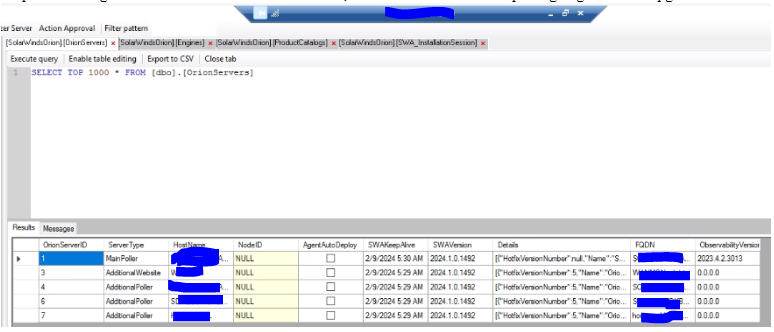
To resolve this problem, perform the following steps: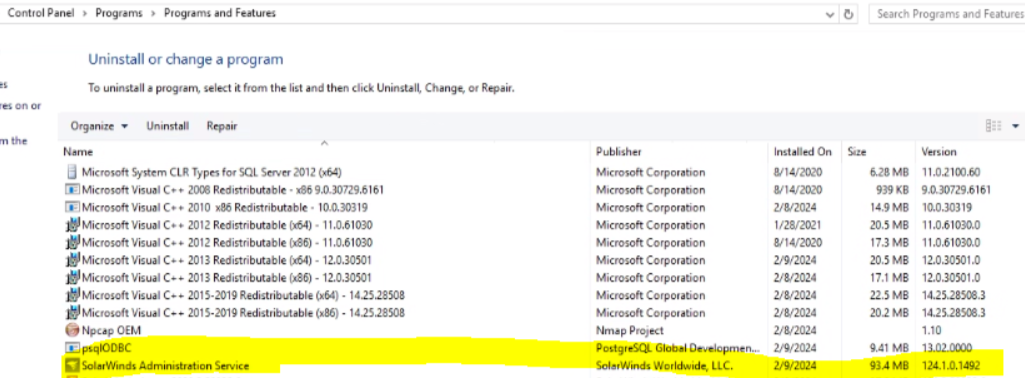

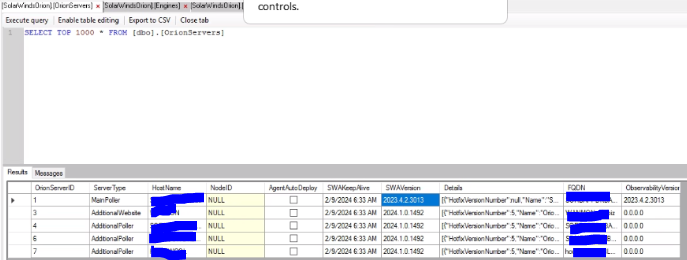
When navigating to the Update tab (Under Settings > My Deployment), Administration Service will be automatically upgrade again. To disable Administration Service from auto-updating, perform the steps below:
For 2024.1 and above:
To resolve this problem, perform the following steps:
- On the Main polling engine, Uninstall the SolarWinds Administration Service Version 2023.4.1 from control panel
- Navigate to C:\ProgramData\SolarWinds\Installers
- Find the AdminstrationService installer. In this example, it is Observability 2023.4.2 Administration Service
- After installation is successful, SWA version should match the older install versions.
- Run the installer on the APE and it proceeds without any error and the installation part was successful
Disable Auto-update for Administration Service:
When navigating to the Update tab (Under Settings > My Deployment), Administration Service will be automatically upgrade again. To disable Administration Service from auto-updating, perform the steps below:
For 2024.1 and above:
- Go to the Advanced configuration page at https://{servername}/Orion/admin/advancedconfiguration/global.aspx.
- Search for AllowSwaAutoUpdate
- Uncheck the box to disable
- Click Save
- Navigate to C:\Program Files\Common Files\SolarWinds\AdministrationService\SolarWinds.Administration.exe.config
- Below <appSettings>, add the following line:
<add key="DevFlags" value="BlockSwaAutoUpdate" />
- From Windows Services, restart SolarWinds Administration Services
- Administration Service will no longer be auto-updated